Fall 2024 Release
View All Releases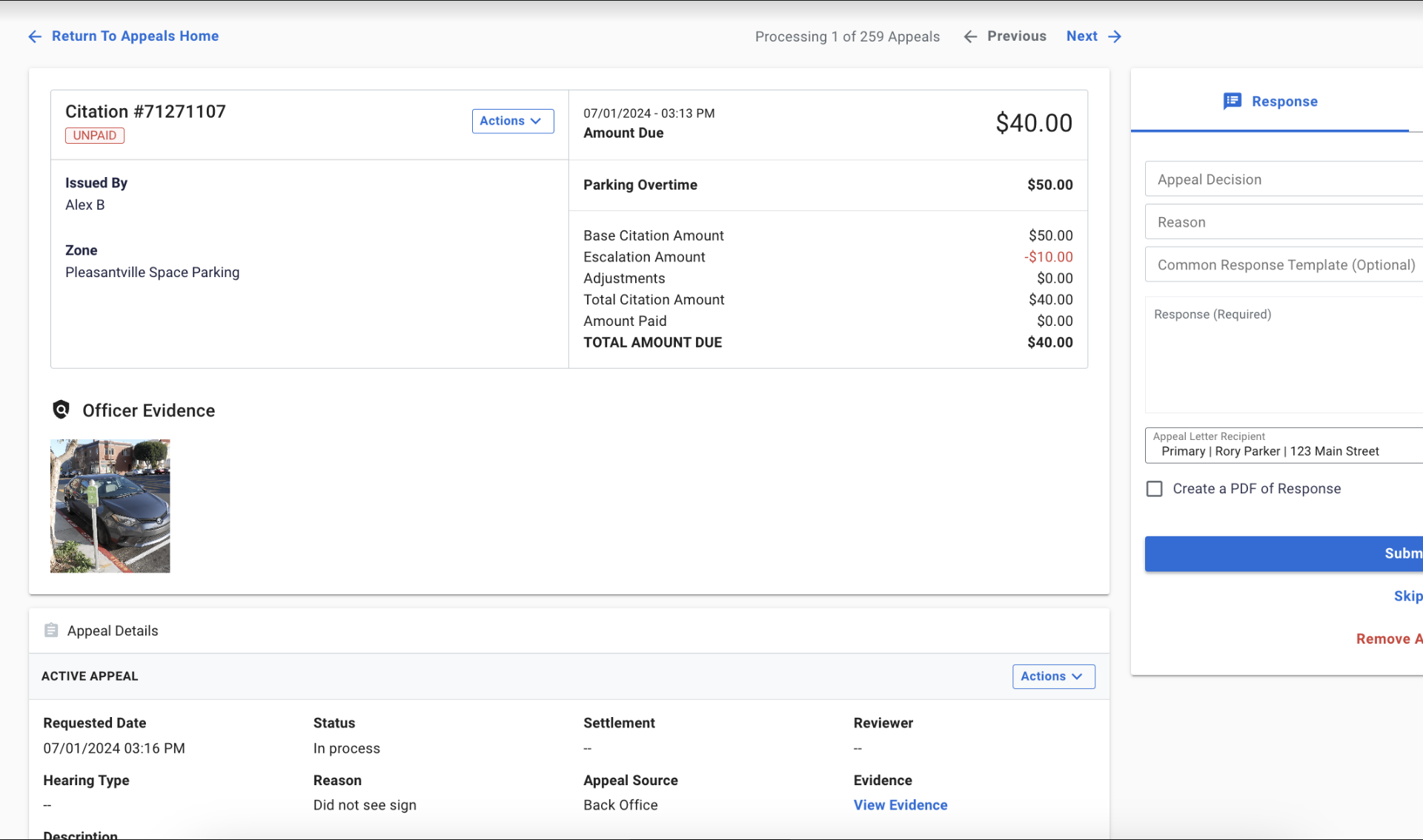
At a Glance
Fall brings a redesigned Appeals screen, VIN scanning, guest checkout for paid parking, new settlement self-service tools, and a wave of enhancements across enforcement, permits, payments, SpotBlock, and back office.
What's New
Refreshed Appeals Screen
The Appeals screen has been redesigned to provide easier access to citation detail. Staff can now add notes, reset the fee schedule, and attach files directly during the appeal process, reducing the number of steps required to act on an appeal.
Guest Checkout
Drivers can now pay for parking without downloading an app or creating an account. Users provide an email address to complete a session, lowering the barrier to entry for first time parkers while maintaining session data for city reporting.
Settlement Batch Self Service Tools
New self service pages allow operators to search settlement batches, view batch details, and inspect individual records, reducing reliance on support for settlement investigation tasks.
Enforcement Compliance Dashboard
The Enforcement Compliance Dashboard is now available in Passport Labs, giving operators visibility into citation metrics and compliance trends directly within Portal without exporting to external tools.
Refreshed Appeals Screen
The Appeals screen has been redesigned to provide easier access to citation detail. Staff can now add notes, reset the fee schedule, and attach files directly during the appeal process, reducing the number of steps required to act on an appeal.
OpsMan Mobile Field Updates
Several improvements to OpsMan Mobile streamline enforcement field operations: ticket upload hardening ensures unsynced citations upload automatically at login; a Previous Window Minutes setting enables more precise filtering of prior citation activity; LPR images are now automatically selected for printing without manual marking; images carry over when creating a new citation from a previous one; and the Violations from LPR queue now displays the address of each violation received from Genetec.
Gallery Selection for Issuance
Officers can now upload photos from their device's media library when issuing citations, rather than being limited to real time captures. Images can also be added later during ticket creation or reporting.
VIN Scanning
Officers can now capture a vehicle's VIN using either the device camera or an external hardware scanner in OpsMan Mobile, reducing manual entry errors and speeding up issuance for situations where VIN is required.
Spanish IVR for Citation Payments
The Interactive Voice Response (IVR) system for citation payments now offers a Spanish language option, improving accessibility for Spanish-speaking individuals during the citation payment process by phone. To enable, please contact Passport support.
Payment Plan Letters in Letters and Receipts
Payment plan letters for each citation in a payment plan now appear in the Letters and Receipts section of Citation Details, giving staff a centralized location to access and verify these letters without navigating away from the citation.
Approval Queue Character Limit Expanded
The Approval Queue now supports full word responses without truncation, ensuring applicants receive complete and clear explanations when their application requires action or has been declined.
Unified Search in Manage Permits
A new single search bar in Manage Permits searches across multiple data fields simultaneously, replacing the need to run separate searches per field.
Permit and SpotBlock Enhancements
Several improvements are now available: a link code email sent when a permit is purchased, a Print Physical Permit button in CMRpay, and the ability to email signage directly from SpotBlock.
SpotBlock Data in Summary Payments Report
Clients using SpotBlock can now view SpotBlock revenue in the Summary Payments report alongside Citation and Parking data, enabling consolidated financial reporting across all product lines.
Customizable Exemption Reasons
Operators can now define custom exemption reasons for SpotBlock reservations, allowing teams to tailor the system to their specific operational needs and improve clarity in reservation management records.
Split Payments Through Funding
Split payments for violation payment plans are now fully supported through the funding stage, resolving a prior issue that caused problems with client funding and settlement reporting for transactions paid through split payments.
Settlement Processing Enhancements
The settlement ingestion process now allows multiple input files to complete sequentially before finalizing the batch. Card present terminal numbers are now mapped directly from processor settlement data, and chargeback fee credits can be calculated and issued for transactions with upfront fees paid by the cardholder.
Premium Reporting for Card Present
A new reporting capability enables a single system to process, view, and reconcile payments made through certified point of sale devices like meters and pay stations. Transaction metrics can now be tracked at the individual device level.
Settlement Batch Self Service Tools
New self service pages allow operators to search settlement batches, view batch details, and inspect individual records, reducing reliance on support for settlement investigation tasks.
Guest Checkout
Drivers can now pay for parking without downloading an app or creating an account. Users provide an email address to complete a session, lowering the barrier to entry for first time parkers while maintaining session data for city reporting.
Transparent Pricing in Passport Parking
The Passport Parking app quote screen has been updated to display the full cost including all fees before checkout, so parkers know exactly what they will be charged with no surprises at payment.
Zone Management UI Enhancements
The Zone Management page now features dynamic row height based on zone name length, centroid display for polygon and line string zone shapes, and improved visibility into which zones have the Find Parking map setting enabled, without needing to review each zone individually.
Status Page Quick Link
A new Quick Link on the Portal homepage gives users direct access to Passport's real time status page, making it easier to check for service disruptions without leaving Portal.
Stay Logged In Across Multiple Tabs
Users can now remain logged into Portal across multiple browser tabs or windows. An active session in one tab will no longer trigger logout in other tabs, reducing workflow interruptions for teams working across multiple pages simultaneously.